
Launcher & app 起動
Pick a road. Pick a car. Press JOIN.
The Project Nihon Launcher puts every experience, every car and the whole community in one window. No server lists, no copied addresses. On your phone, the Android app keeps the guides, cars, maps and news in your pocket.
⬇ Windows launcher ⬇ Android app How it works
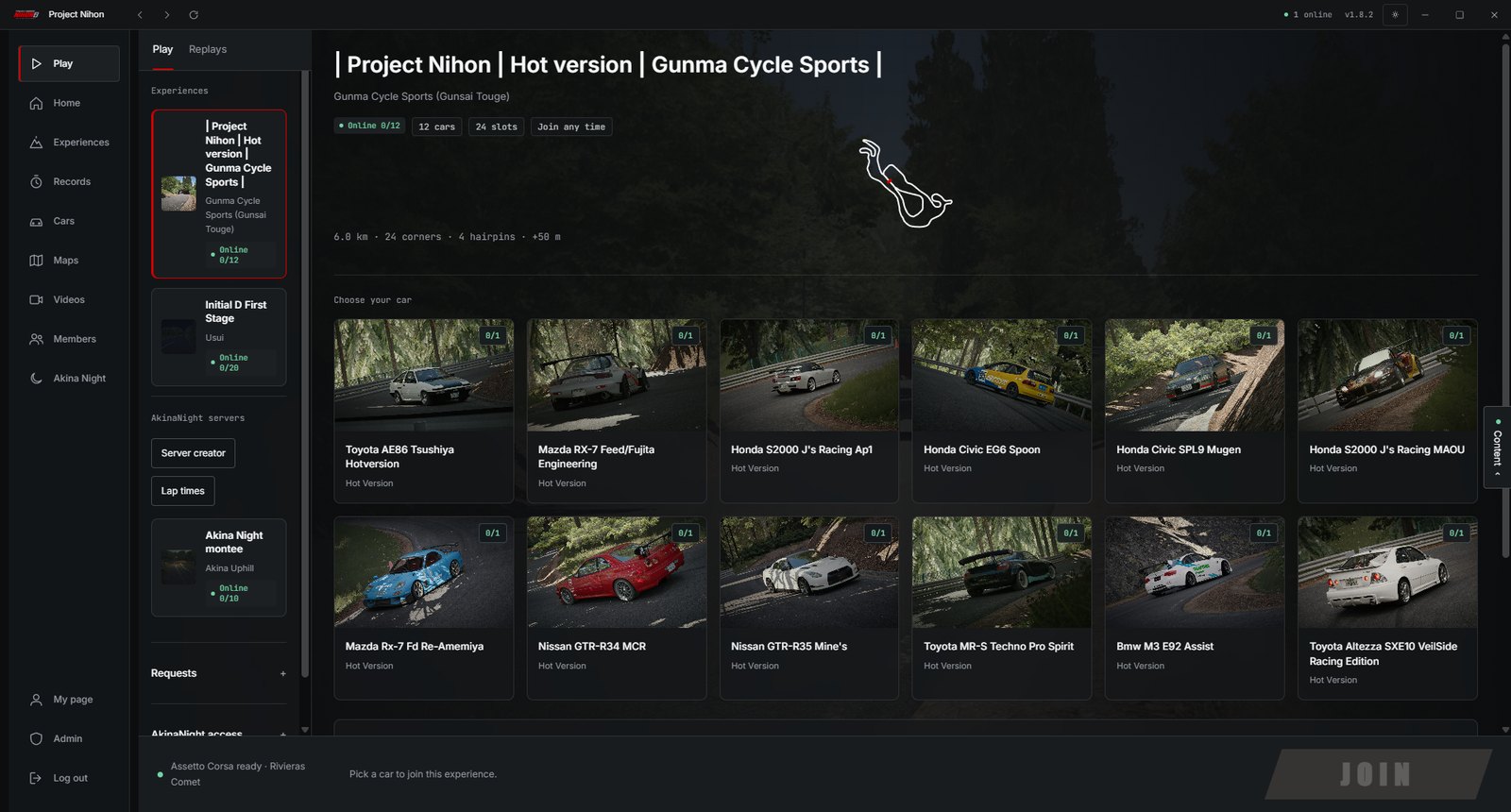
The full experience. Browse the experiences, choose your car and join the server in one click. Assetto Corsa starts by itself and drops you on the road.
⬇ Download (109 MB)Everything to read, nothing to install a game for: guides, cars, maps, news, records and the community. You cannot join a server from the phone, that stays on the launcher.
⬇ Download the APK (1 MB) Open it in your browser| ONE-CLICK JOIN参加 | Choose your car, press the button. Assetto Corsa starts and drops you on the server. |
| LIVE SERVERS稼働 | See who is on the road before you load in, and which route is running. Plus a few things we keep for the app. |
| THE CARS車 | Browse each experience's cars with the same details as the site, then pick yours. Every car comes with its own sheet. |
| SKY SYNC夜 | Night is night. The launcher syncs the time of day so everyone drives the same road. |
| COMMUNITY仲間 | Time attack, news, videos and members in the same window, with the same account. And a bit more. |
| AUTO-DETECT検出 | Detects Assetto Corsa by itself. Missing a car or a map? It tells you what to do. |
A few things stay a surprise until you open the app.
| WINDOWSOS | Windows 10 or 11, 64-bit, for the launcher. |
| ASSETTO CORSAゲーム | The Steam version of the game. |
| CUSTOM SHADERS推奨 | Recommended, kept up to date. |
| ANDROID携帯 | Android 7 or newer for the app. Nothing else to install. |
Both Windows and Android warn about apps they have never seen before. It does not mean anything is wrong with the file: we are a small project and do not pay for the certificates that remove these messages. Here is exactly what to click. The pictures are illustrations, your screen may look slightly different.
On Windows 窓
1. Windows shows “Windows protected your PC”. Click More info, the small link in the text.
2. A new button appears. Click Run anyway and the installer starts.
On Android 携帯
1. Tap the downloaded file. Android says unknown apps are blocked for your browser: tap Settings, switch on Allow from this source, go back and tap Install.
2. If Google Play Protect steps in, tap More details then Install anyway. The app then opens like any other.
Windows says “Windows protected your PC”
That is the SmartScreen filter, which flags any installer it has not seen thousands of times. Click More info, then Run anyway. See the pictures above.
Android says it cannot install from an unknown source
Android blocks every app that does not come from the Play Store until you allow it once for your browser. Tap Settings, switch on Allow from this source, go back and tap Install. If Google Play Protect then asks, choose More details and Install anyway.
Is it safe?
Yes. The launcher only talks to project-nihon.fr, it opens links in your normal browser, and the site is hardened against the usual attacks. You sign in through Steam’s own page, so we never see your Steam password. The Android app is a window onto the public pages of this site: it cannot read your files. The only reason for the warnings is that the installers are not signed with a paid certificate yet.
How do I install the APK?
Open the download on your phone, tap the file, allow the install if Android asks, then tap Install. If you prefer, skip the install and open the same pages in your browser.
Can I join a server from my phone?
No. Joining needs Assetto Corsa on a PC, so it stays in the Windows launcher. The phone app is for the guides, cars, maps, news and records.
Is there an iPhone version?
A real iOS app is very unlikely for now. Apple only lets apps in through the App Store, which needs a paid developer account and a review for every update, and for a simple companion like this one it is not worth it. The good news: open project-nihon.fr/app in Safari, tap Share, then Add to Home Screen. You get the same content with its own icon.